🧩 The Coupon Bros Extension

Save money automatically while you shop online


⭐ Hero Section (Top Fold)

Headline:

Never overpay again online.

Subheadline:

The Coupon Bros Chrome Extension automatically finds and applies the best coupon codes at checkout.

Primary Button (CTA):
👉 Add to Chrome — It’s Free

Secondary text under button:

Works on thousands of stores like Amazon, Walmart, and more.


(Right side image or GIF)

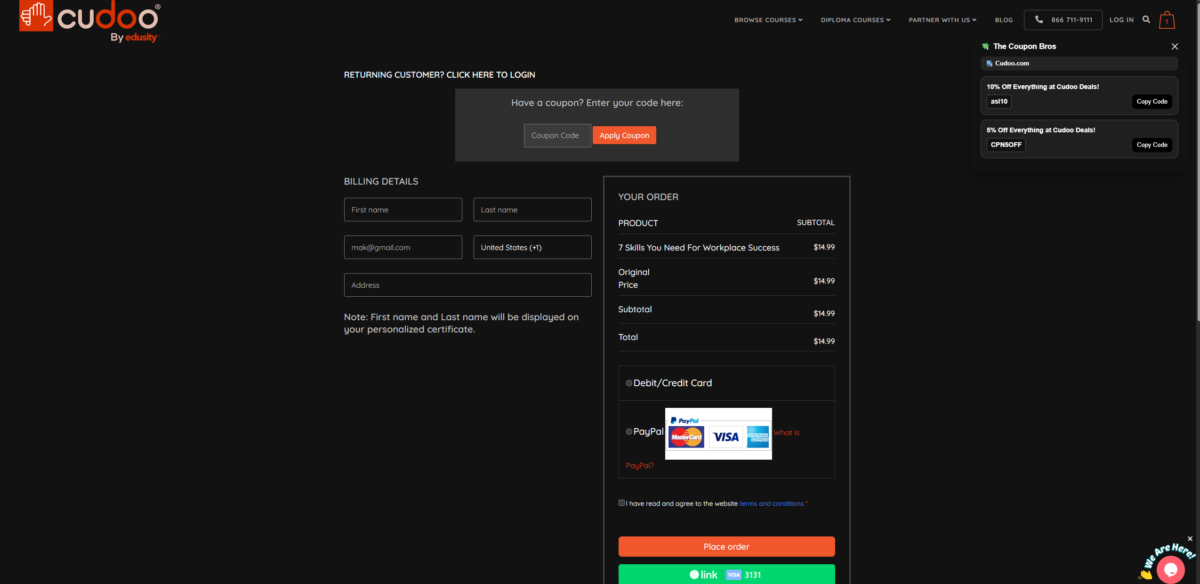
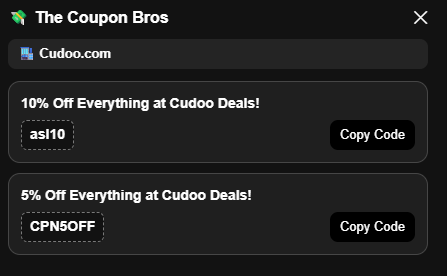
  • Screenshot of extension popup working

⚡ How It Works (3 Steps)

1. Install the Extension 🧩

Add The Coupon Bros to Chrome in one click.

2. Shop Normally 🛒

Go to your favorite online store.

3. Save Automatically 💸

We test and apply coupon codes instantly at checkout.


🔥 Key Features Section

💰 Automatic Coupon Finder

No more searching for codes — we do it for you.

⚡ Instant Savings

Coupons are tested and applied in seconds.

🛍 Works on Top Stores

Amazon, fashion, tech, beauty, and more.

🔒 Safe & Secure

No tracking of personal browsing or payment info.


📸 Extension Preview Section

Title:

See it in action

Add 2–3 screenshots:

  • Popup showing coupons found
  • Checkout page with discount applied
  • Store list/search inside extension

⭐ Why Users Love It

  • “Saved me $23 on my first order”
  • “Better than manually searching coupons”
  • “Works every time at checkout”

🚀 Call to Action Section (Second CTA)

Headline:

Start saving money today

Button:
👉 Install Chrome Extension

Small text:

Free forever. No hidden fees.


❓ FAQ Section

Does it work on all websites?
It works on thousands of major online stores.

Is it free?
Yes, the extension is 100% free.

Does it slow down browsing?
No, it runs only when you reach checkout pages.

Do I need an account?
No account required to use basic features.


📌 Manual installation required
Since The Coupon Bros Extension is not yet on the Chrome Web Store, you’ll need to install it manually.

⬇️ Download the Extension here:

🧩 The Coupon Bros Chrome Extension 📥

🧩 How to install

  1. Download the extension file
  2. Extract the ZIP file
  3. Open Chrome → go to chrome://extensions
  4. Enable Developer Mode (top right)
  5. Click “Load unpacked”
  6. Select the extracted folder

🧩 How to Use The Coupon Bros Extension 💸✨

👉 Step 1: Go to any online store and add your items to the cart 🛒
👉 Step 2: When you’re ready to checkout, click the extension icon 🧩
    📍 You’ll find it in the top-right corner of your browser (where all extensions are located)
👉 Step 3: The extension will pop up automatically 💥
👉 Step 4: It will instantly show all verified coupon codes for that store 🔍💰
👉 Step 5: Copy your code, apply it at checkout, and enjoy your savings 🎉💳

💡 Tip: Make sure you’re on the checkout page or store site for the best results!

Chrome Web Store Extension Launch

🧩 Coming soon to the Chrome Web Store
We’re in the process of getting The Coupon Bros Extension officially listed on the Google Chrome Web Store for easy installation.

🧠 Footer Trust Line

The Coupon Bros Extension is designed for Chrome users to automatically find and apply coupon codes while shopping online.